Orientation - Agentic AI as R&D Collaborators

From "Tool User" to "Research Director" — The Beginning of a Paradigm Shift

Week 1 of Phase 1: Onboarding & Literacy (Weeks 1-4)

Contents

Aligning our perspectives and setting up the environment

📖 1. Lecture
  • Course Overview: The paradigm shift
  • From "Using Tools" to "Directing Agents"
💻 2. Practice
  • Vibe Coding via Google AI Studio
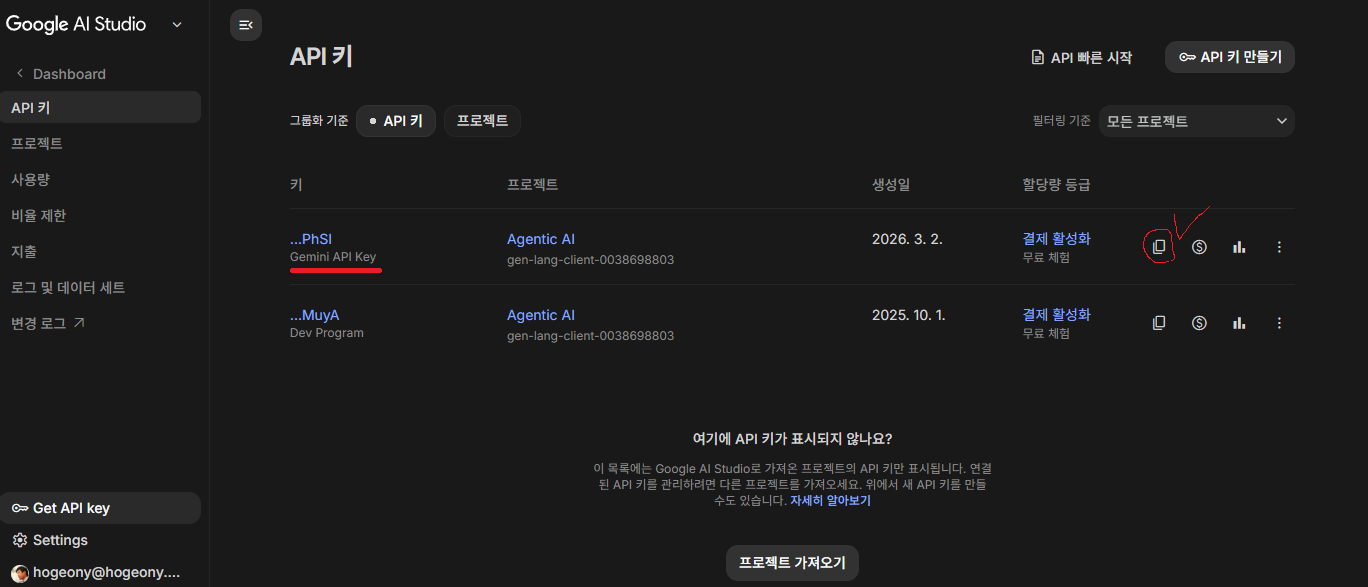
  • Getting Google AI Studio API Key (free-tier)
  • Local Environment Setup: Python + Antigravity (AI Agent IDE) + Ollama (Local LLM)
🗣️ 3. Discussion
  • Visit: UST LMS → Class → Discussion
  • Is AI a research assistant or a crutch?
  • Defining the human-AI boundary

Structure & Evaluation

Harmonizing technical practice with philosophical depth

🔄 Weekly Flow
  • 1 hr: Lecture & Practice (Build Components)
  • 1 hr: Deep Discussion (Philosophy & Ethics)
  • Async: Discussion Forum Debate (for 1 week)
📊 Evaluation Weights
  • 30%: Participation & Debate
  • 30%: Mid-term Proposal (Video Pitch)
  • 30%: Final Showcase (Demo Day)
  • 10%: General Attendance
graph LR A["Discussion Forum (1 week)"] --> B["Lecture + Practice (1 hour)"] B --> C["Discussion Review (1 hour)"] style A fill:#e1f5fe,stroke:#0288d1 style B fill:#fff3e0,stroke:#f57c00 style C fill:#e8f5e9,stroke:#388e3c

In This Course, You Will

Not just learn to "use" AI, but to "direct" AI

🎯 Ultimate Goal
  • Transition from AI Tool Consumer (passive user)
  • To Research Director (active orchestrator)
  • Design & operate your own AI Agent system
🔬 What You'll Learn
  • AI Agent principles & architecture
  • Prompt Engineering & Tool Use
  • Multi-Agent collaboration system design
  • Ethical responsibility & Human-in-the-Loop

Who Is This Course For?

Key message: "The mindset of collaborating with AI" matters more than coding skills in this course.
CategoryWelcome If You Are...Consider Other Courses If...
InterestGrad student wanting to leverage AI Agents for R&DWant to build LLMs from scratch
BackgroundPython basics + curiosity about AI is enoughAlready proficient in building multi-agent systems
ExpectationInterested in philosophical & ethical implications of AIOnly focused on pure algorithm / model training

Weekly Flow

Lecture & Practice (1 hr)
Deep Discussion (1 hr)
Discussion Forum in UST LMS Debate
💡 Why This Structure?
  • Lecture & Practice: Hands-on building of Agent components
  • Deep Discussion: Philosophical & ethical questions (e.g., "Who owns a paper written by AI?")
  • Discussion Forum in UST LMS: Async debate — training to articulate ideas in writing

Evaluation = Measuring Director Capability

Not code quality, but how well you "directed" AI

🗣️ Participation & Debate (30%)
  • Active debate on Discussion Forum in UST LMS
  • Peer feedback & mutual evaluation
  • "Good questions" score higher than "good answers"
📝 Midterm Proposal (30%)
  • Your personalized AI Agent system proposal
  • 5-min video pitch + document
  • Persuasively argue: "Why is this Agent needed?"
🚀 Final Showcase (30%)
  • Demo Day: Live demonstration of a working Agent
  • "The Director's Report": Reflective essay on managing AI
  • Includes peer evaluation
Attendance (10%)
  • General attendance check

The Research Director Mindset

Transitioning from 'Using Tools' to 'Directing Agents'

🧱 Orchestration → Coding
  • Connect AI components like Lego blocks.
  • Design the high-level architecture.
⚖️ Ultimate Responsibility
  • The Director is always at fault for data hallucinations.
  • "The AI made a mistake" is an unacceptable excuse.
🕵️ Human-in-the-Loop (HITL)
  • Automate repetitive tasks.
  • Intentionally stay at critical decision points for scientific validity.

Paradigm Shift Comparison

The way you use AI is about to fundamentally change

graph TD subgraph "The Past: 'Using Tools' Era" H1[Human Researcher] -->|Prompt| C[Chatbot AI] C -->|Text Output| H1 H1 -->|Copy & Paste| Doc[Document/Code] H1 -->|Manual Fix| Doc style H1 fill:#ffcdd2 end
graph TD subgraph "The Future: 'Directing Agents' Era" H2[Research Director] -.->|High-level Goal| A[Agentic AI] A -->|Self-Correct| A A -->|Execute| T1[Python] A -->|Search| T2[Web Browser] A -->|Read/Write| T3[File System] A ===>|Final Outcome| H2 style H2 fill:#c8e6c9 style A fill:#bbdefb end

Right Now, the Paradigm Is Shifting
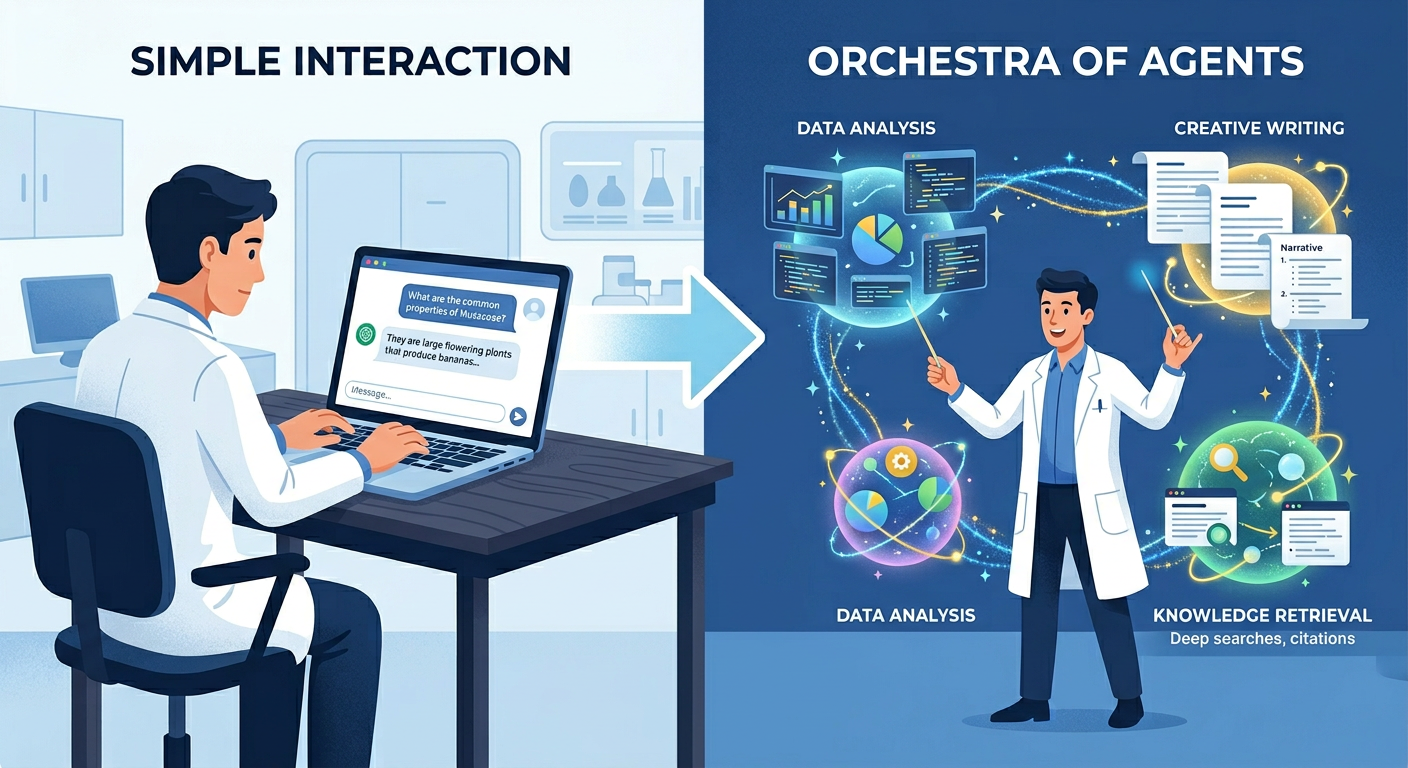
The way you use AI is about to fundamentally change

1772439188875
Left side — a person typing a question into ChatGPT at a laptop. Right side — the same person standing like an orchestra conductor, directing multiple AI agents performing different tasks. A large arrow in the center. Professional, minimal illustration style.
Image Prompt: "Split illustration, left side: a researcher typing a question into a chatbot on a laptop screen, simple and passive interaction. Right side: the same researcher standing like an orchestra conductor, directing multiple AI agents represented as glowing orbs performing different tasks (coding, searching, writing). A large arrow in the center pointing from left to right. Clean, professional, minimal flat illustration style, blue and white color palette."

Before: The AI Tool User Era

Most of us are still at this stage right now

"AI is just a smart search engine" — This is the Tool User's perspective

😅 A Familiar Scene
  • Ask ChatGPT a question → copy answer → paste into document
  • "Fix this code" → manually apply the result to the file
  • Search → request summary → search again → summarize again...
  • Every step is manually connected by a human
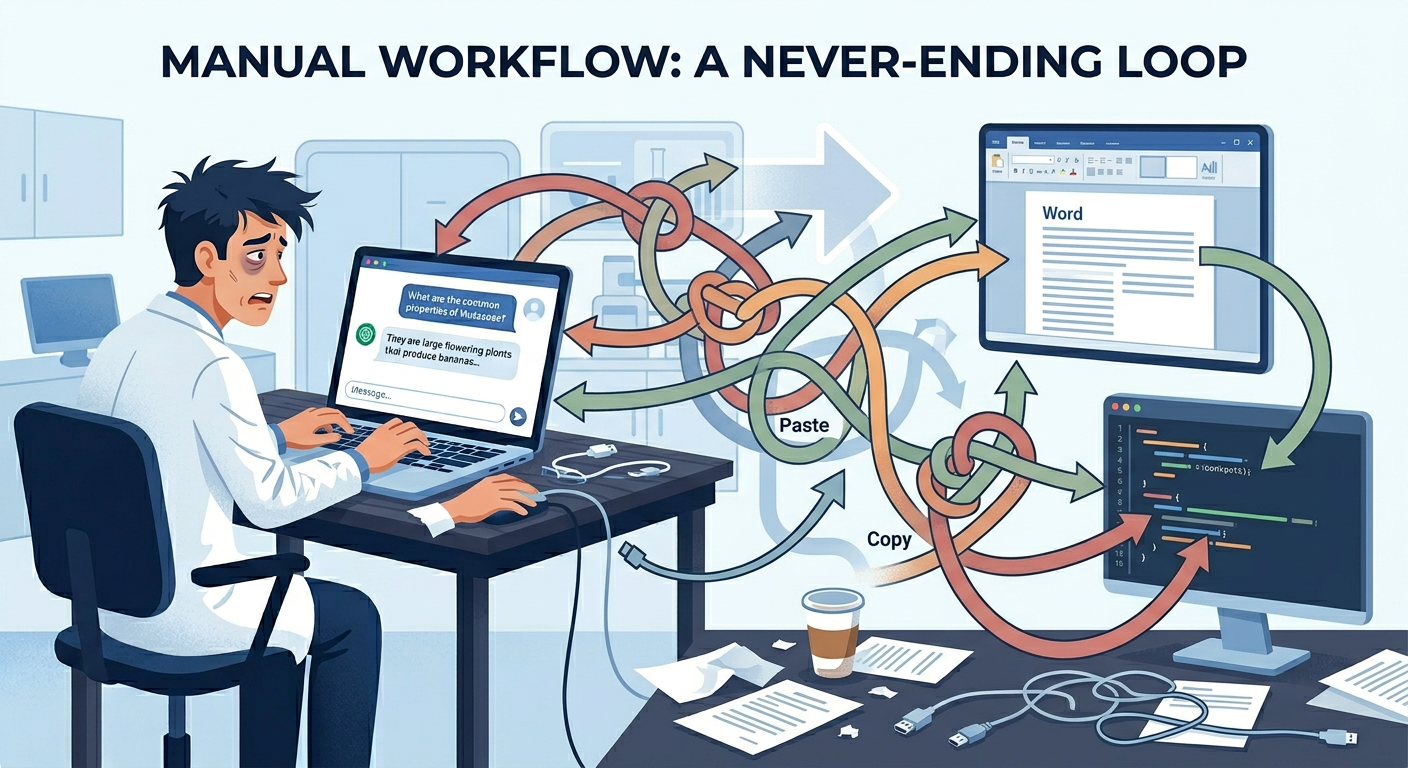
1772439303876
A person going back and forth between ChatGPT and a Word document, copy-pasting. Arrows tangled everywhere, person looks exhausted. Simple diagram style.
Image Prompt: "Diagram showing a frustrated researcher sitting at a desk, manually copying text from a ChatGPT window to a Word document, then to a code editor, then back to ChatGPT. Multiple tangled arrows showing the manual back-and-forth workflow. Simple, clean diagram style with subtle humor, muted colors."

After: The Research Director Era

You are no longer the executor — you are the conductor

"AI is my research team" — This is the Director's perspective

🎬 The New Landscape
  • "Find 5 relevant papers on this topic and summarize them" → Agent searches, downloads & summarizes
  • "Analyze this data, visualize it, and draft a report" → Agent runs the entire pipeline
  • "Find bugs in the code, fix them, and run the tests" → Agent executes autonomously
  • The human sets the goal and verifies the result
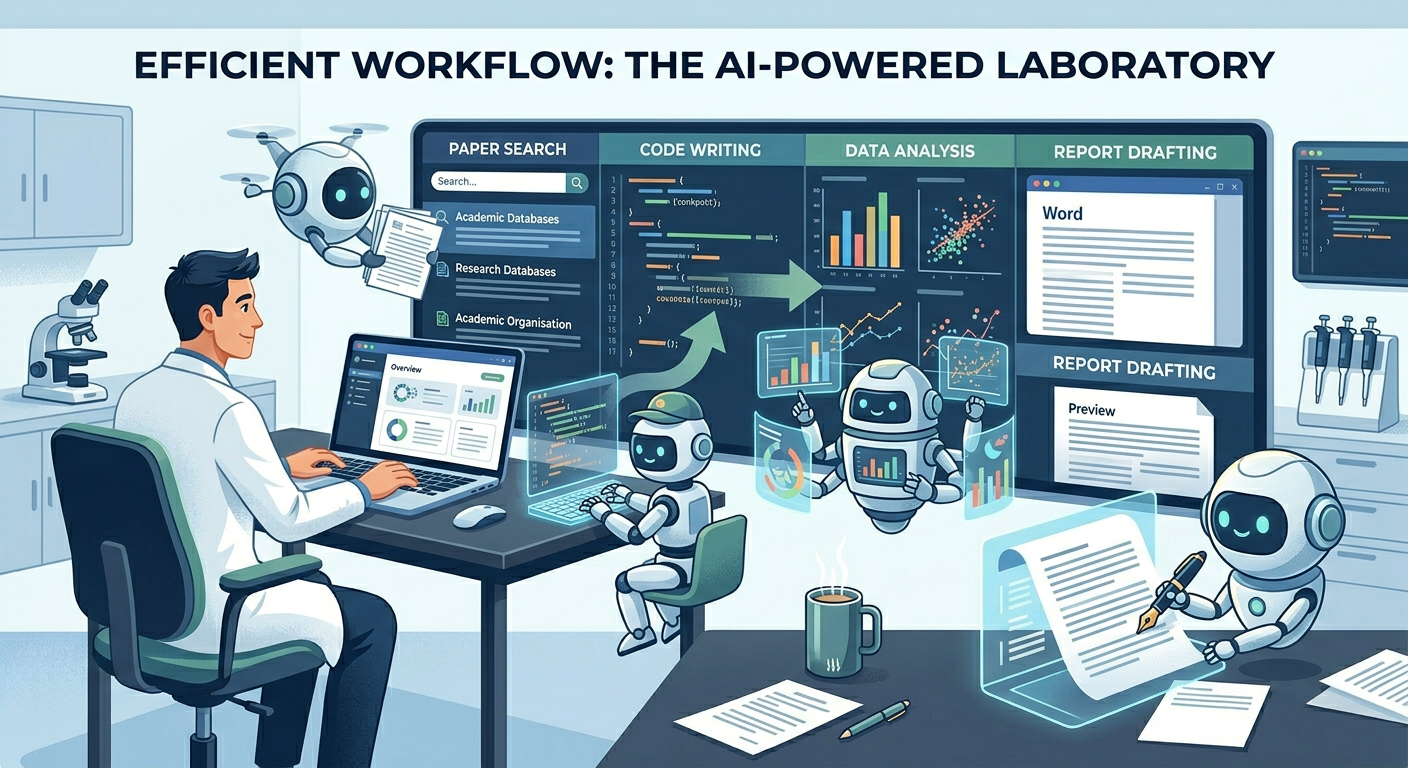
1772439359868
A person sitting comfortably, looking at a dashboard. Multiple AI Agents performing paper search, code writing, data analysis, report drafting. Clean, futuristic feel.
Image Prompt: "A researcher comfortably sitting in a modern office, looking at a dashboard screen. Around them, multiple AI agents (represented as friendly robot assistants or glowing orbs) are simultaneously performing tasks: one is searching academic papers, another is writing code, another is analyzing data charts, another is drafting a report. Clean, futuristic but warm illustration style, blue and green tones."

Understanding by Analogy: The Film Director

A Research Director is like a film director

🎬 A Film Director...
  • Doesn't act in scenes (= doesn't code everything)
  • Doesn't operate the camera (= doesn't search everything)
  • Sets the vision, orchestrates the team, and takes responsibility for quality
🎯 A Research Director...
  • Doesn't write all the code personally
  • Doesn't read every paper manually
  • Sets the research direction, orchestrates AI Agents, and takes responsibility for accuracy
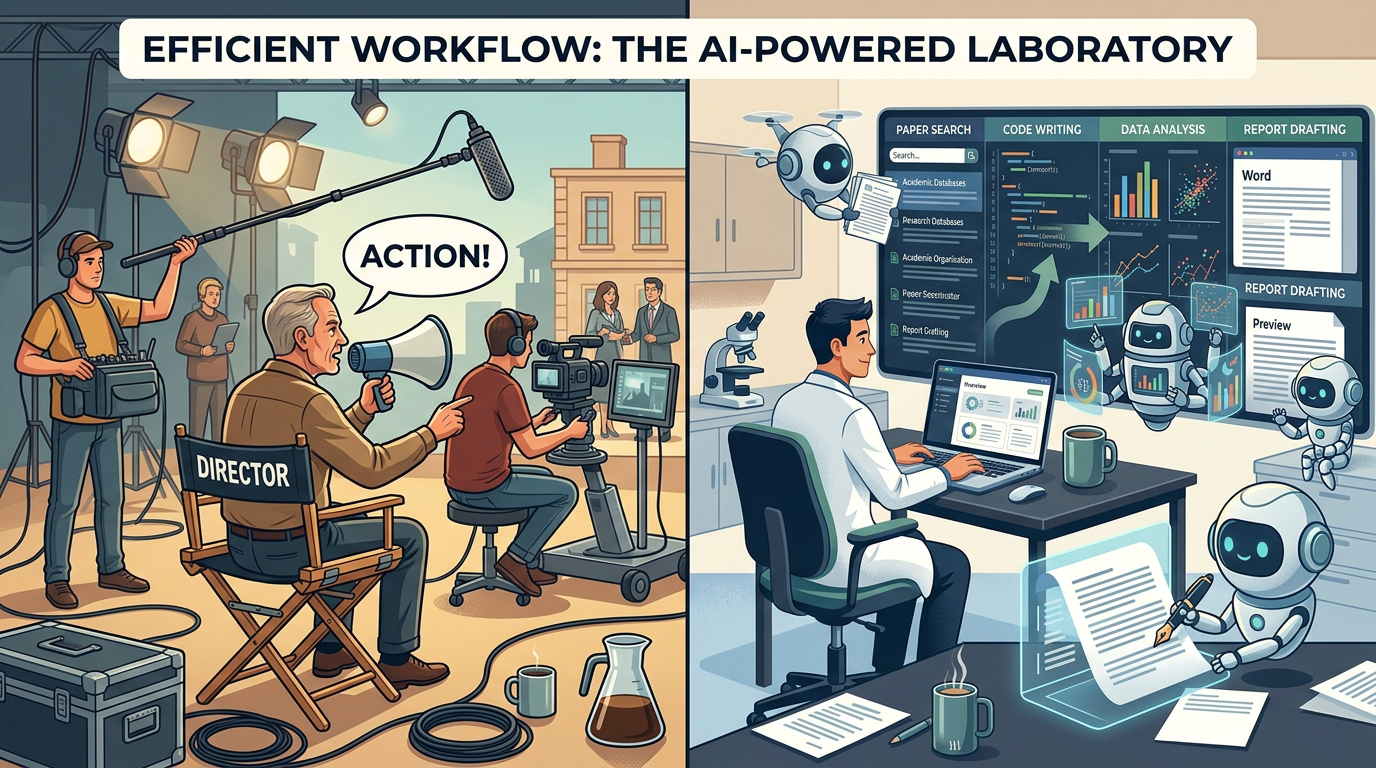
1772439418837
Left — a film director in a chair shouting "Action!" directing a crew. Right — a researcher directing multiple AI Agents on screens. 1:1 visual parallel.
Image Prompt: "Split comparison illustration. Left: a film director sitting in a director's chair on a movie set, saying 'Action!' with camera crew, actors, and lighting team around them. Right: a researcher at a modern desk, directing multiple AI agents displayed on screens - one agent searching, one coding, one analyzing. Visual parallel between the two scenes. Professional, warm illustration style."

AI Agents Are Already Here

This is not a distant future. It's happening right now

🤖 Claude Code (Anthropic)
  • Understands codebases and autonomously modifies them
  • Creates files, runs tests, debugs — all on its own
  • The developer just "directs" and "reviews"
🔬 AI Science Research Agents
  • Automates: paper search → hypothesis generation → experiment design
  • e.g., ChemCrow (chemistry experiment automation)
  • e.g., GPT-Researcher (automated research reports)
💼 Business Agents
  • Automates: customer inquiry → analysis → response
  • e.g., Salesforce Einstein, Microsoft Copilot
  • Not simple chatbots — they manage entire business workflows

References:

📚 The state of AI in 2025: Agents, innovation, and transformation (November 5, 2025) 📚 ChemCrow paper

Tool vs Agent — The Core Difference

Understanding this distinction is half the course

CategoryAI ToolAI Agent
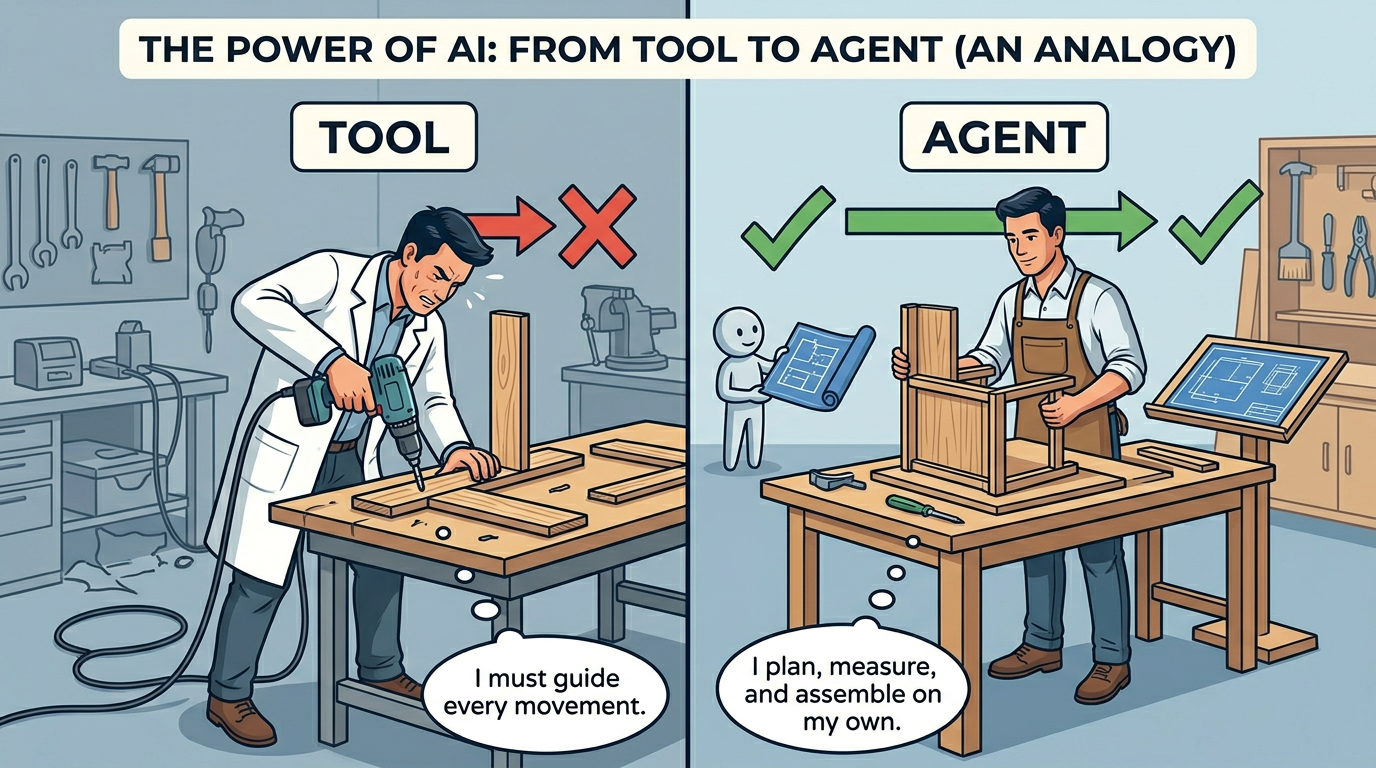
AnalogyA power drillA skilled carpenter
BehaviorOnly works when the user presses the buttonGiven a goal, plans and executes on its own
Example"Translate this sentence""Read this paper and create a Korean summary report"
On failureOutputs an error messageAnalyzes the cause and tries a different approach
MemoryStarts fresh every timeRemembers context from previous tasks
Tool useNone (it IS the tool)Uses search, code execution, file management, etc.
1772439502927
Left — a power drill (tool), a person holding it and doing manual work. Right — a skilled carpenter (agent), independently building furniture from a blueprint. Simple analogy illustration.
Image Prompt: "Split comparison illustration. Left side labeled 'Tool': a person holding a power drill, manually drilling into wood - they control every movement. Right side labeled 'Agent': a skilled carpenter independently building furniture from a blueprint - they plan, measure, cut, and assemble on their own. The person just provided the blueprint. Clean, minimal illustration, educational style."

Same Task, Different Approaches

Given the assignment: "Survey related papers and write a literature review"

😓 The Tool User's Day
  • 1. Search keywords on Google Scholar
  • 2. Open and read papers one by one
  • 3. Copy-paste each into ChatGPT: "Summarize this paper" — repeat
  • 4. Manually compile summaries in Word
  • 5. Write the literature review sentences yourself
  • Time required: 2-3 days
😎 The Research Director's Day
  • 1. Instruct the Agent: "Find 20 papers from the last 5 years on this topic and organize key contributions"
  • 2. Agent automatically: searches → downloads → summarizes → categorizes → drafts review
  • 3. Director reviews: Missing papers? Misinterpretation? Gives correction instructions
  • 4. Agent applies revisions → Final literature review complete
  • Time required: 2-3 hours (+ verification time)

The 3 Core Competencies of a Research Director

The capabilities you'll develop this semester

🧱 Orchestration
  • Combine AI components like Lego blocks
  • Design which Agent gets which role
  • "Architecture thinking" matters more than "coding skills"
  • e.g., "What if we connect a Search Agent + Summary Agent + Writing Agent?"
⚖️ Accountability
  • Ultimate responsibility for AI-generated output belongs to the Director
  • Detect and correct hallucinations and biases
  • "The AI said so" is never an excuse
  • e.g., If the AI cites a non-existent paper → Director's responsibility
🕵️ Human-in-the-Loop (HITL)
  • Automate everything, but intervene at critical decision points
  • Scientific validity and ethical judgment are NOT delegated to AI
  • e.g., Medical AI Agent suggests a diagnosis → Final call is the doctor's

Human-in-the-Loop (HITL)

"Where should a human intervene?" — This is the Director's key decision

Agent Starts
Result
⚠️ Human Review
Continue or Redirect
Final Output
💡 When HITL Is Needed
  • When interpreting insights from data (statistical significance judgment)
  • When ethical judgment is required (personal data inclusion)
  • When making creative direction decisions (choosing research hypotheses)
  • Before results are published externally (papers, reports)
⚠️ What Happens Without HITL?
  • AI cites non-existent papers (hallucination)
  • Biased data leads to incorrect conclusions
  • Copyright-infringing content generated
  • Credibility and academic integrity compromised
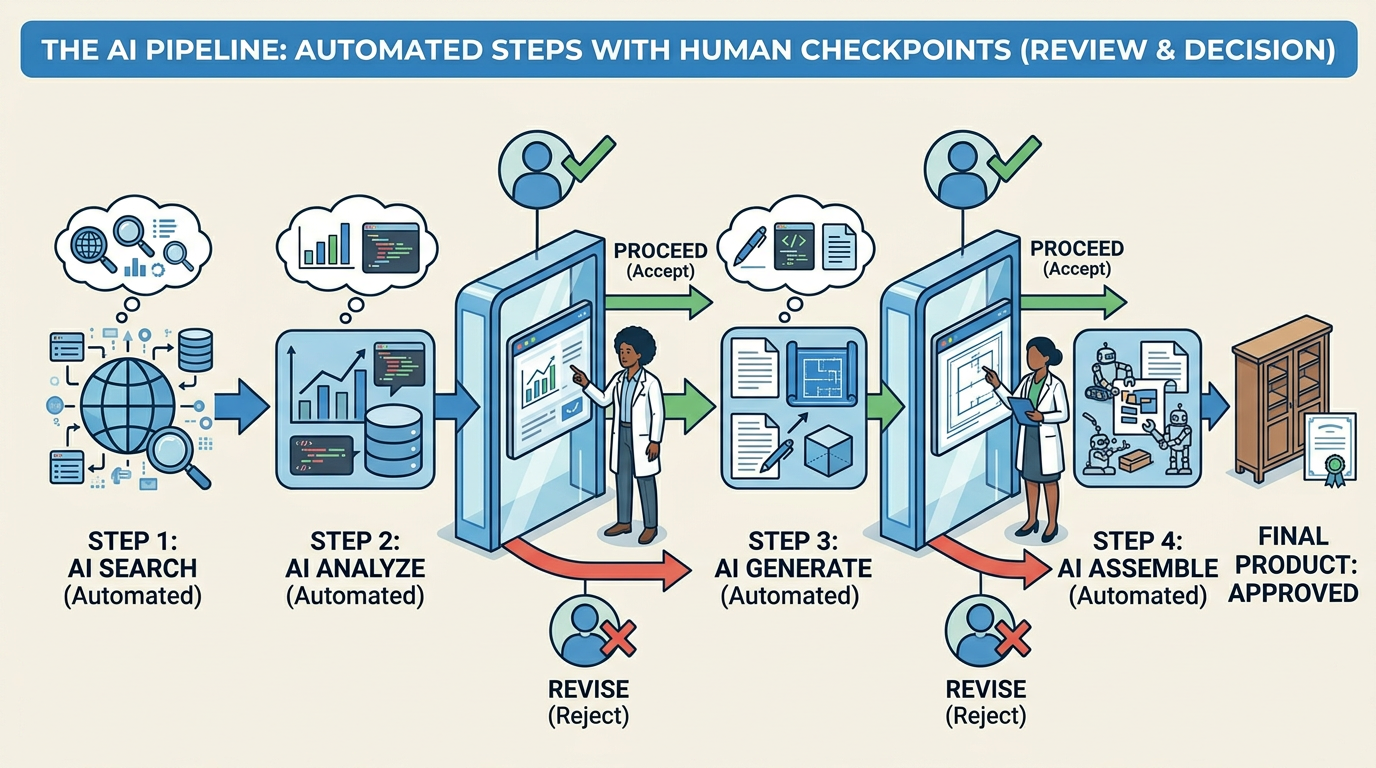
1772440348120
Pipeline diagram. Automated steps by AI Agent with "Human Review" checkpoints in between. Checkpoint has human icon with green checkmark / red X.
Image Prompt: "A horizontal pipeline diagram showing an AI agent workflow. Multiple automated steps (search, analyze, generate) shown as connected blue boxes with arrows. At key decision points, there are 'checkpoint' gates with a human icon, a green checkmark and a red X. The human figure is reviewing the intermediate output before allowing the pipeline to continue. Clean, professional infographic style."

16-Week Roadmap

Transitioning from Tool User to Research Director

📌 Phase 1: Onboarding & Literacy (Weeks 1-4)
  • Week 1: Orientation & Paradigm Shift
  • Week 2: LLM Capabilities & Local Setup (Ollama)
  • Week 3: Prompt Engineering & Research Personas
  • Week 4: Tool Use & Function Calling
🔧 Phase 2: Workflow Automation (Weeks 5-8)
  • Week 5: Web UI Layout (Streamlit/Gradio)
  • Week 6: Auto-Scraper & Meta Extraction
  • Week 7: Auto-Drafting Results from Data
  • Week 8: Mid-term Evaluation (Video Pitch)
⚖️ Phase 3: Management & Reliability (Weeks 9-12)
  • Week 9: Task/Flow Design (LangGraph basics)
  • Week 10: Evaluation Systems & Rubrics
  • Week 11: Self-Correction & Reflection Nodes
  • Week 12: RAG & Long-term Context Memory
🚀 Phase 4: Collaboration & Future (Weeks 13-16)
  • Week 13: Multi-Agent Systems & Team Dynamics
  • Week 14: Safety & Audit Interfaces (Human-in-the-Loop)
  • Week 15: Expansion (MCP & External Lab Connectivity)
  • Week 16: Final Showcase (Demo Day)

This Semester's Discussion Topics

Each week, we tackle one philosophical or ethical question together

🧠 Questions to Think About
  • "If an AI Agent's code has a bug, who is responsible?"
  • "Can AI-generated research results be included in a paper?"
  • "How much autonomy should we give an AI Agent?"
  • "Can AI Agents replace human researchers?"
  • "How much should we disclose AI usage in research?"
💬 Class activity: For each question, run a pro/con debate on Discussion Forum in UST LMS and select the most persuasive argument.

Wrap-Up of Today's Lecture

Three things to remember from today

1️⃣ The Paradigm Shift
  • AI "Tool User" → AI "Research Director"
  • Not executing yourself, but directing and verifying
2️⃣ Agent ≠ Chatbot
  • Agents autonomously plan, use tools, and self-correct
  • Not a "smart search engine" but an "autonomous research partner"
3️⃣ The Director Bears Responsibility
  • Ultimate accountability for AI output
  • Human-in-the-Loop at critical decision points

Part 2: Practice

Environment Setup & First Mission

🛠️ Vibe Coding with Google AI Studio

Create Web App as you wish

📚 Google AI Studio

1. Visit Google AI Studio (https://aistudio.google.com/)

2. Log in with your Google account

3. Click "Build" button on the left sidebar

4. Type the following prompt in the prompt box:

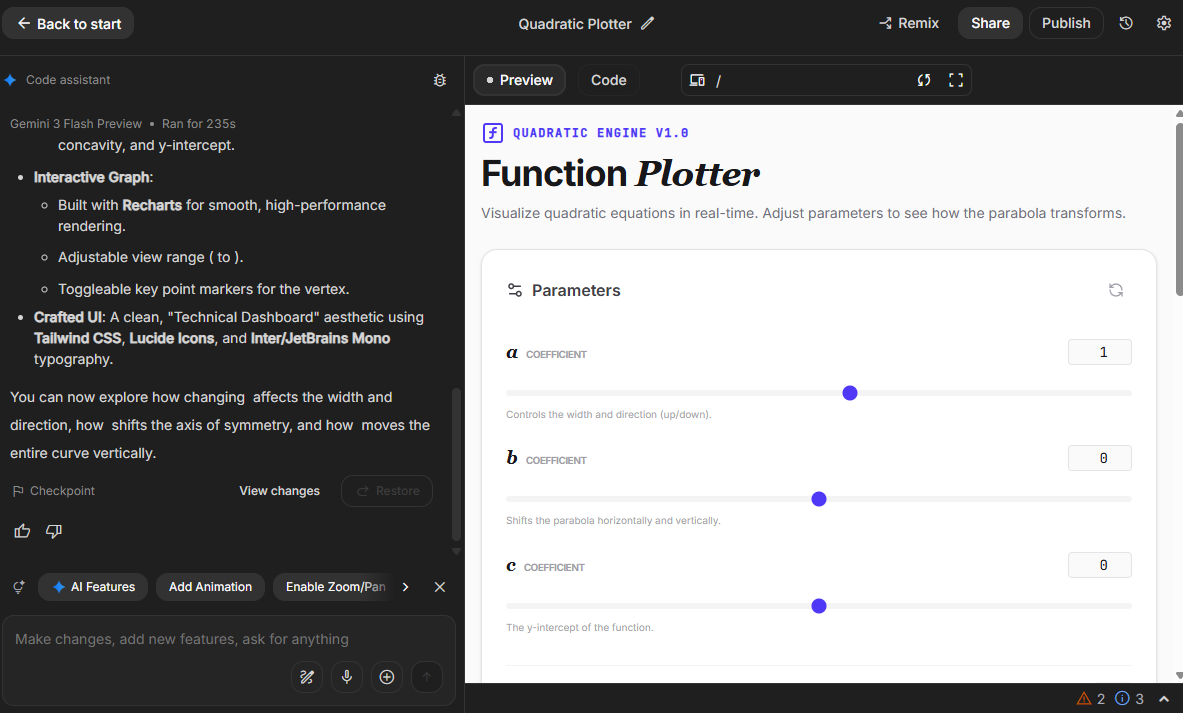
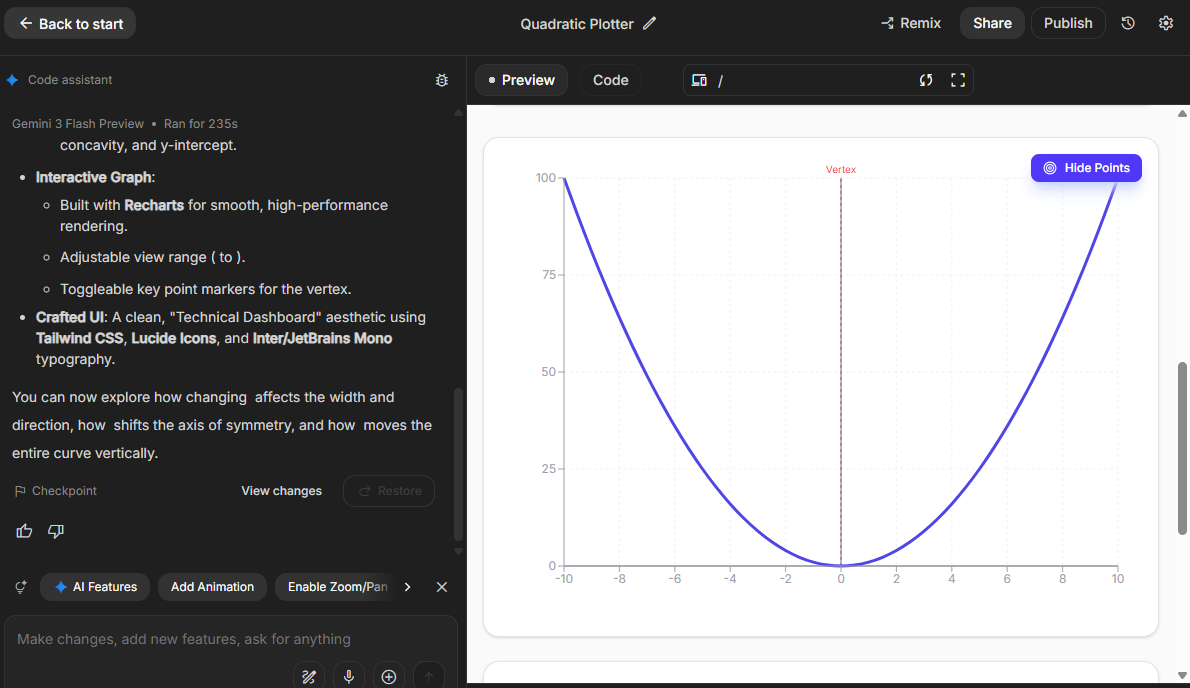
Create a web app that plots $y=ax^2+bx+c$ based on the input of $a, b, c$
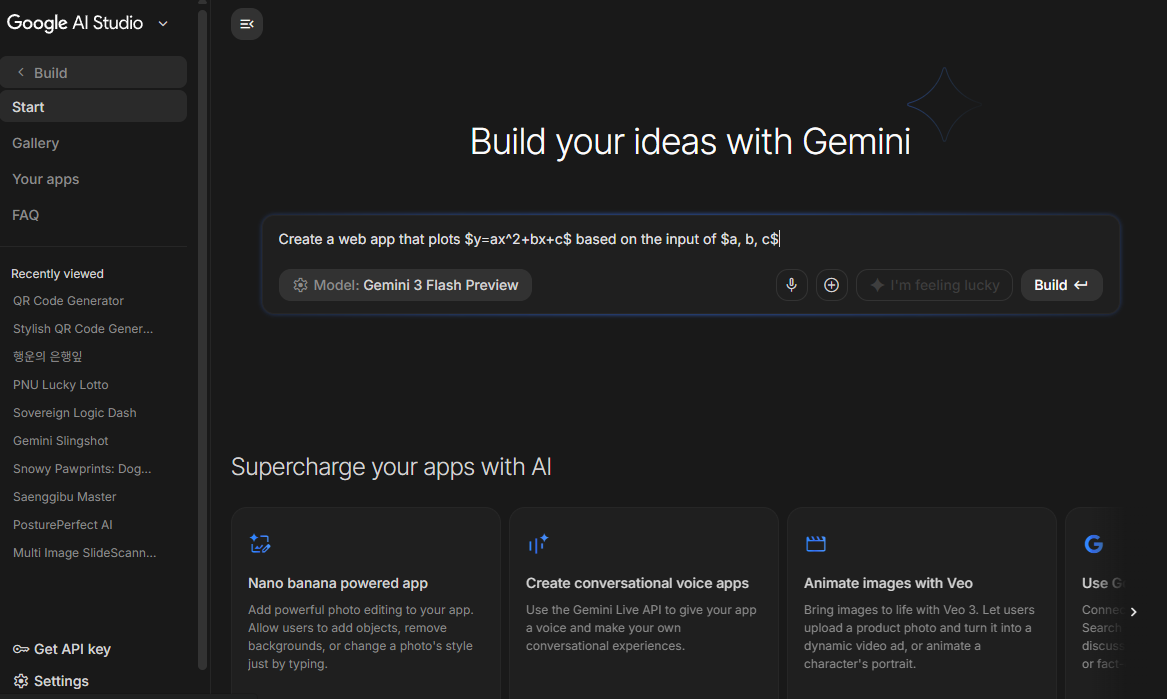
5. Click "Build" button under the prompt box

1772458424547
Google AI Studio
1772459270535
Web App UI created by Gemini
1772459301307
Web App UI created by Gemini
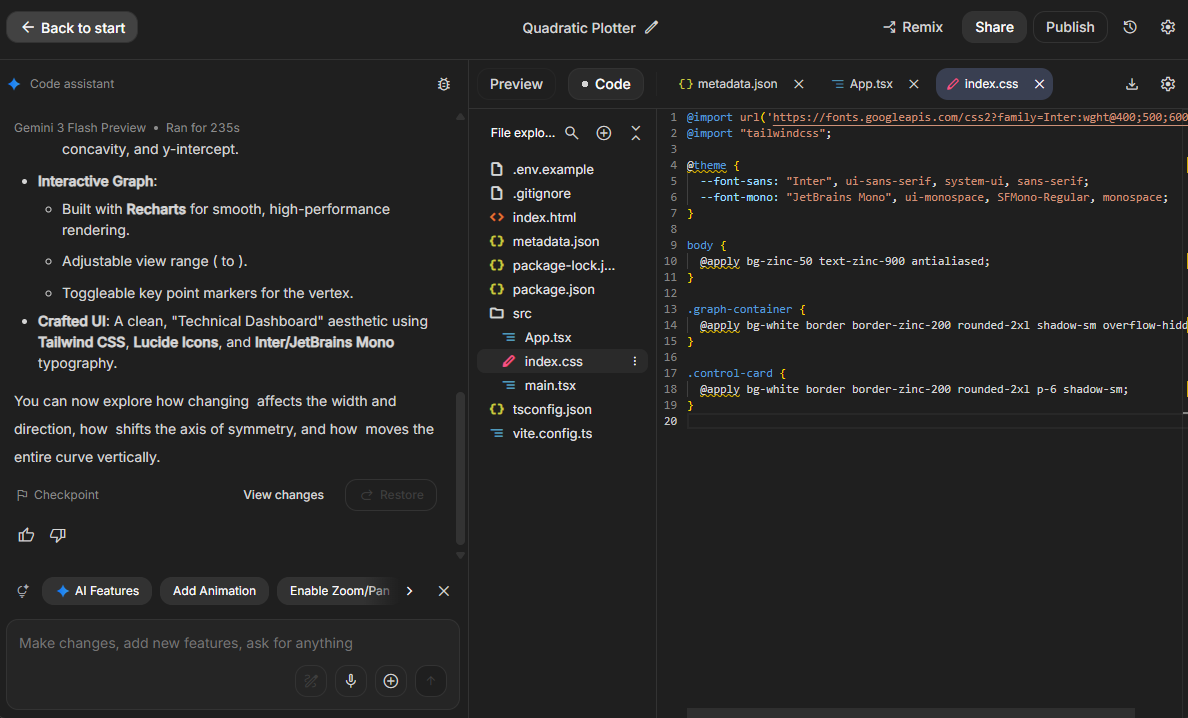
1772459281960
Web App Code created by Gemini

How to get Google API Key

Get API Key from Google AI Studio to run the code locally

📚 Google AI Studio

1. Visit Google AI Studio (https://aistudio.google.com/)

2. Log in with your Google account

3. Click "Get API Key" button on the top right corner

4. Click "Create API Key" button

5. Click "Copy" button

6. Click "Done" button

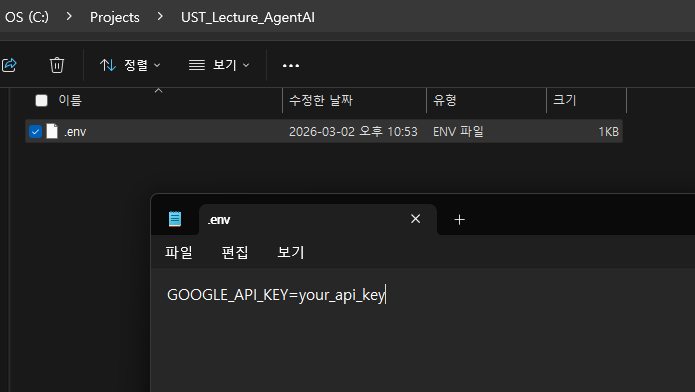
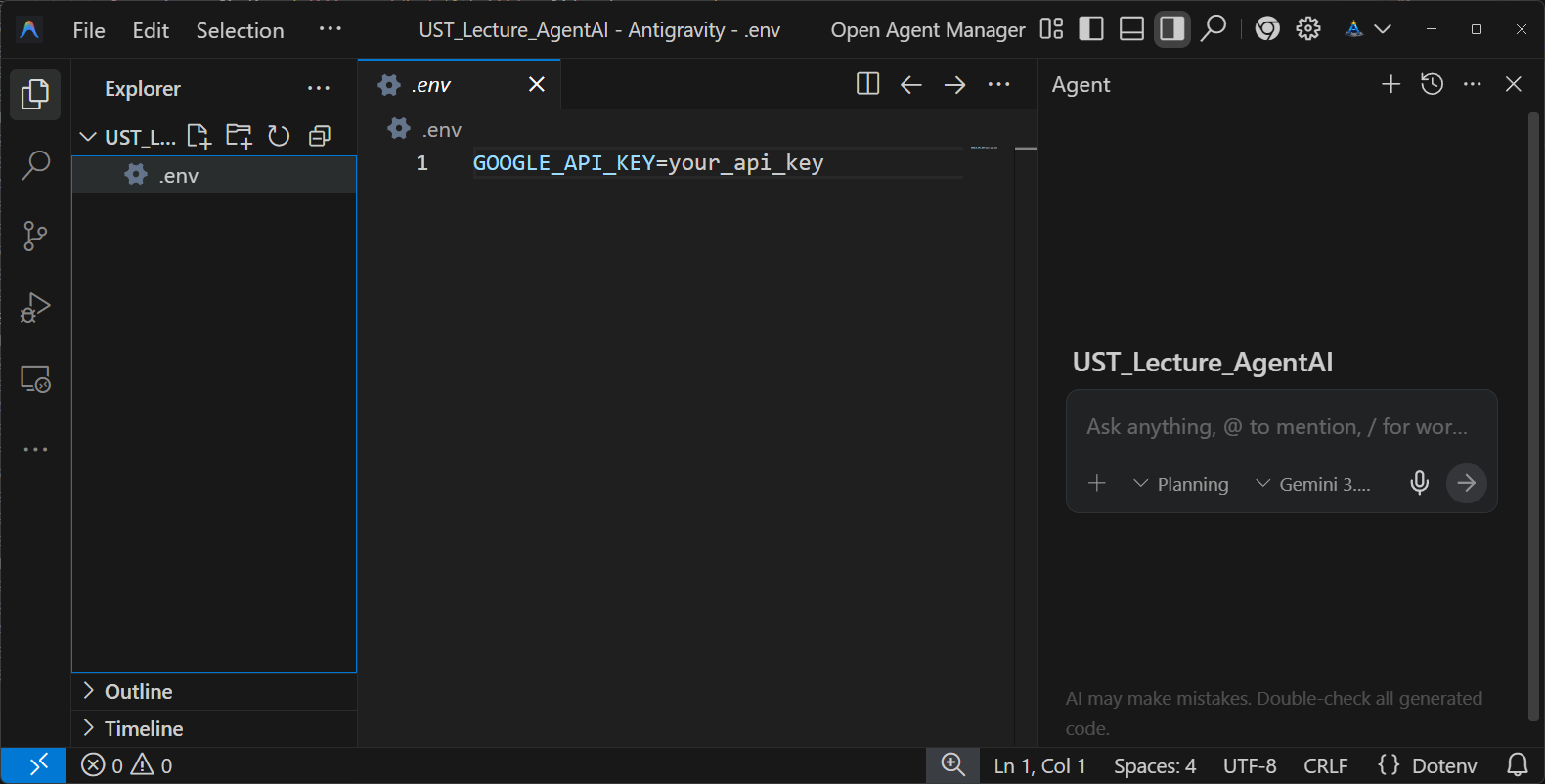
7. Save the API Key in .env file as follows:

GOOGLE_API_KEY=your_api_key
1772460083015
Get API Key
1772459627236
Save API Key

Local Environment Setup (Windows) (1/3)

Step 1. Python 3.12.10 Setup

1. Download Python 3.12.10 - April 8, 2025 Windows installer (64-bit):

https://www.python.org/downloads/windows/
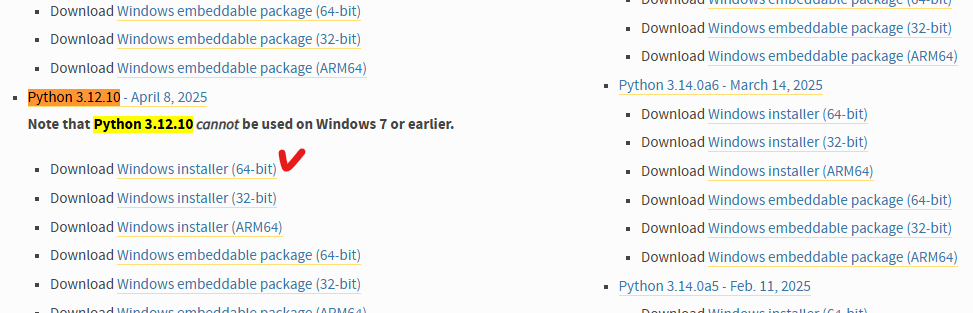
1772459212492
Find Python 3.12.10 via Ctrl+F

🚨 CRITICAL: Check Add python.exe to PATH during installation.

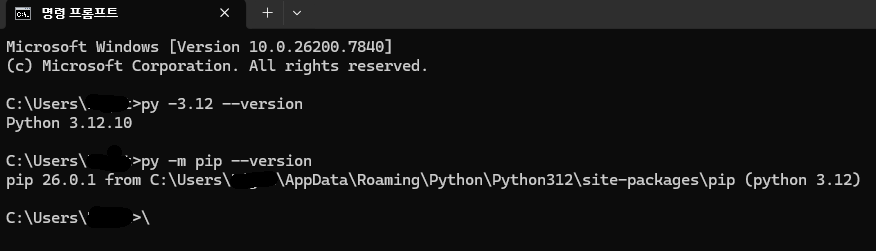
2. Verify your installation in PowerShell or CMD:

py -3.12 --version
py -m pip --version
1772460696669

Local Environment Setup (macOS) (1/3)

Step 1. Python 3.12.10 Setup

1. Download Python 3.12.10 - April 8, 2025 macOS 64-bit universal2 installer:

https://www.python.org/downloads/macos/

2. Verify your installation in Terminal:

python3 --version
python3 -m pip --version

Local Environment Setup (Ubuntu) (1/3)

Step 1. Python 3.12.10 (via pyenv)

Ubuntu OS depends on its default python3. Do NOT modify or replace it. Using pyenv is highly recommended.

# 1. Install pyenv dependencies
sudo apt update
sudo apt install -y build-essential curl git libssl-dev zlib1g-dev libbz2-dev libreadline-dev libsqlite3-dev libffi-dev liblzma-dev tk-dev

# 2. Install pyenv and Python 3.12.10
curl https://pyenv.run | bash
pyenv install 3.12.10
mkdir -p ~/UST_Lecture_AgenticAI && cd ~/UST_Lecture_AgenticAI
pyenv local 3.12.10
python --version

Local Environment Setup (2/3)

Step 2. Virtual Environment (venv)

We strongly recommend using venv to avoid package conflicts during the course.

Windows (cmd):

cd C:\Study
mkdir UST_Lecture_AgenticAI
cd UST_Lecture_AgenticAI
py -3.12 -m venv .venv
.\.venv\Scripts\activate
python -m pip install -U pip

macOS / Ubuntu:

mkdir -p ~/UST_Lecture_AgenticAI
cd ~/UST_Lecture_AgenticAI
python3 -m venv .venv
source .venv/bin/activate
python -m pip install -U pip

Local Environment Setup (3/3)

Step 3 & 4. Libraries and IDE (Antigravity)

3. Install Basic Libraries (Data & Visualization Prep)

python -m pip install numpy pandas matplotlib jupyter ipykernel

4. Setup Antigravity IDE

📚 Antigravity

Antigravity is Google's agent-first development platform.

  • Download and install: https://antigravity.google/download
  • Log in with your Google account.
  • Open your UST_Lecture_AgenticAI folder.
  • Follow instructions to verify .venv is recognized.
1772460915459

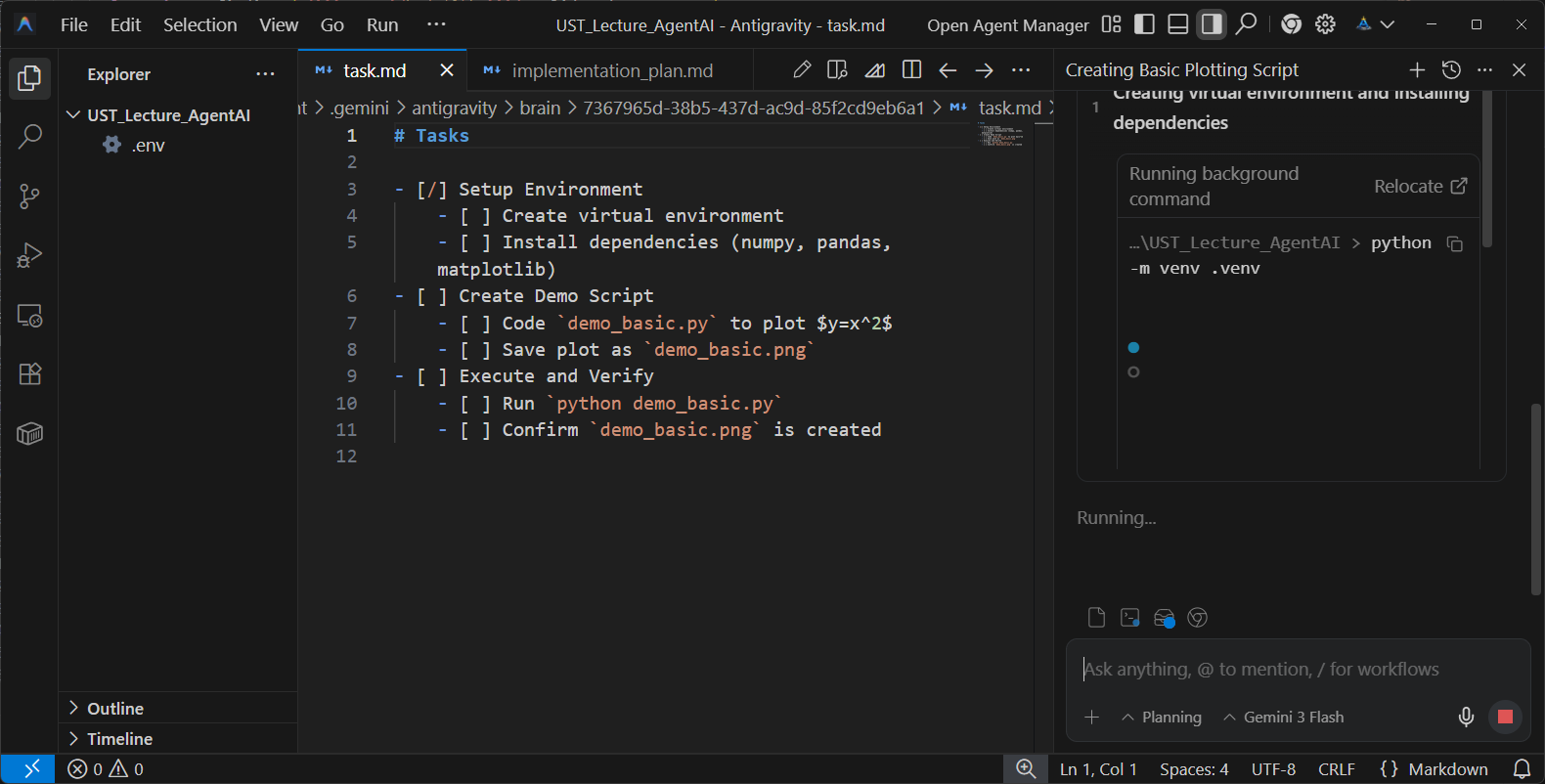
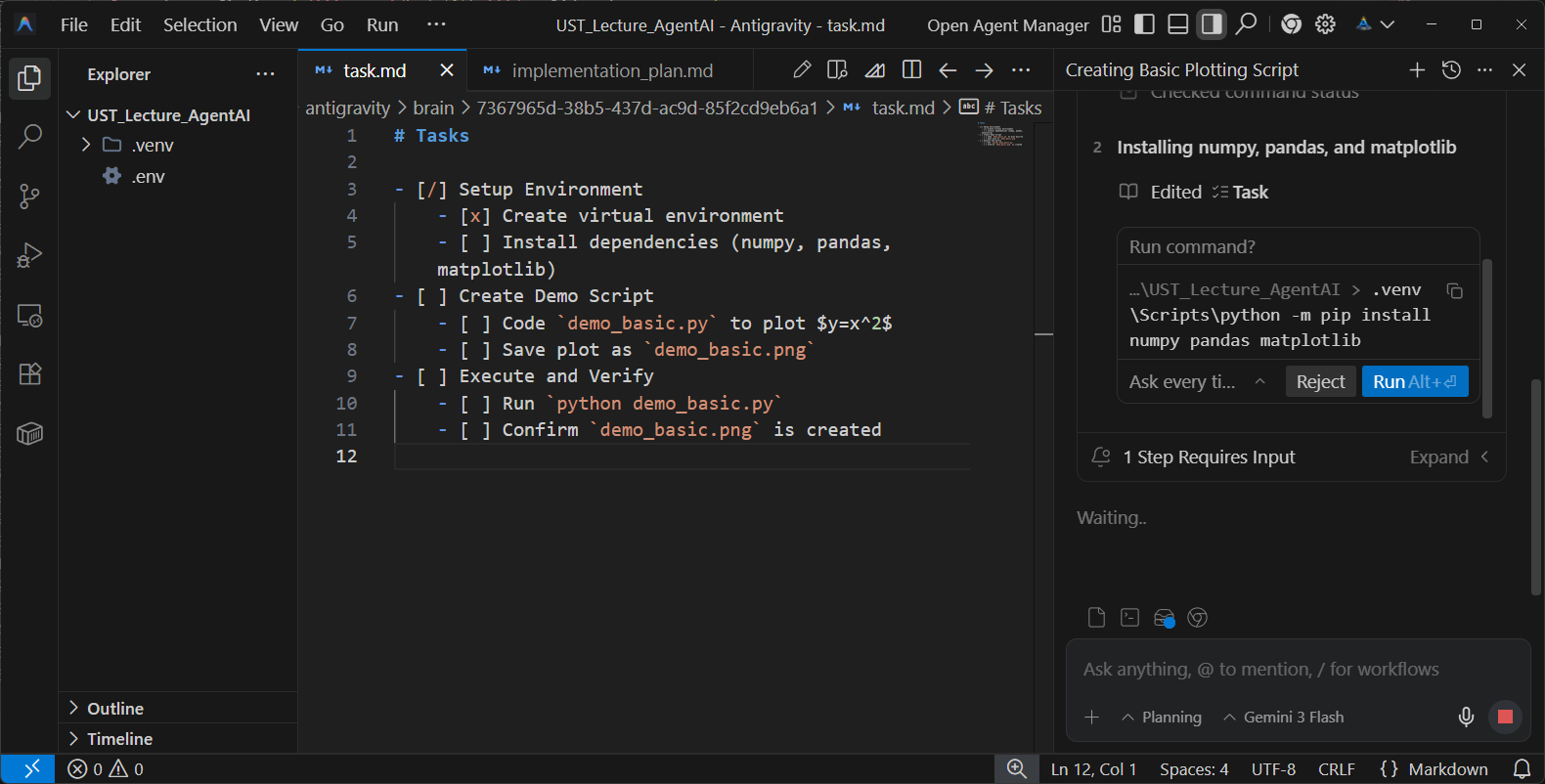
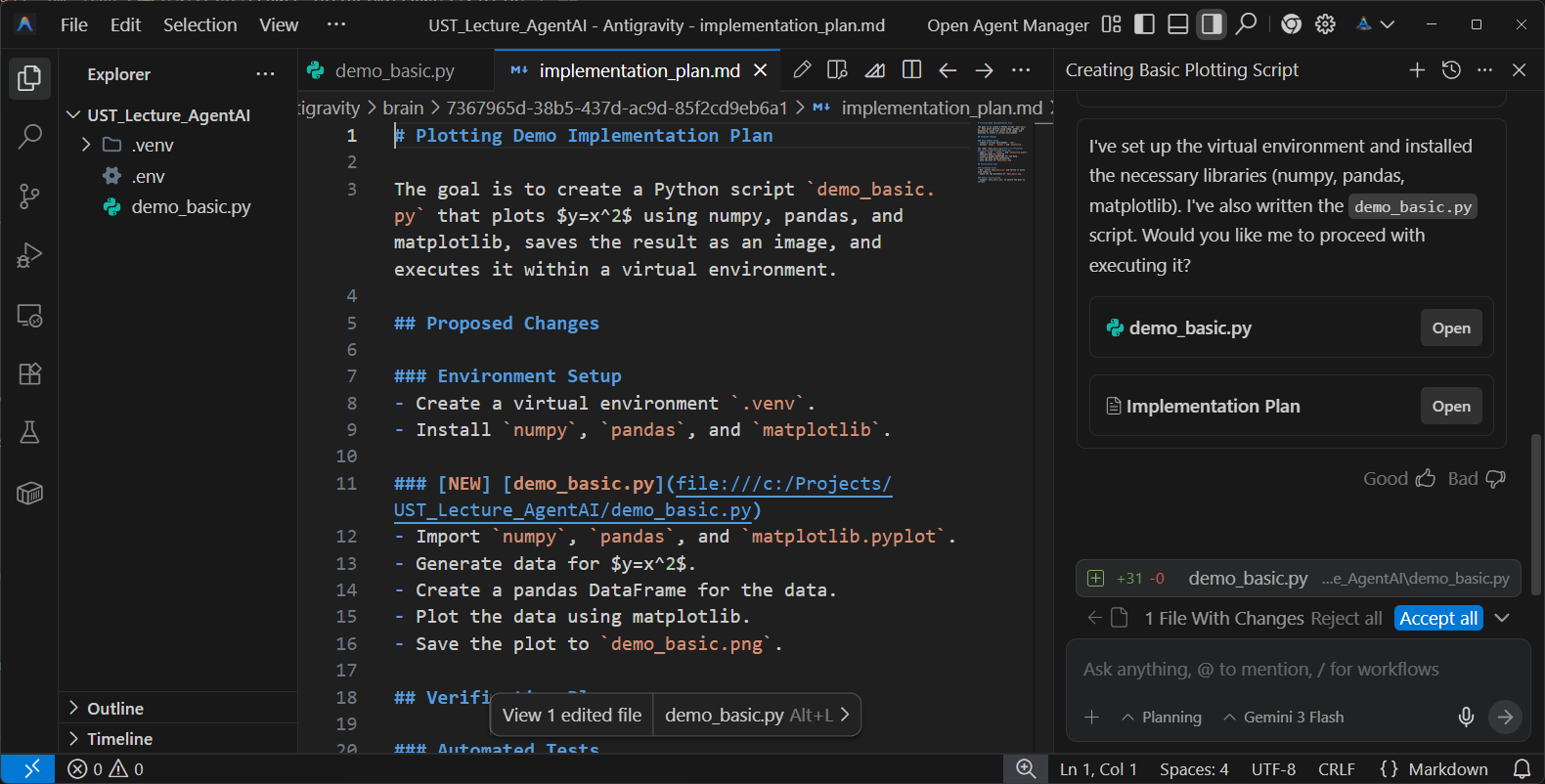
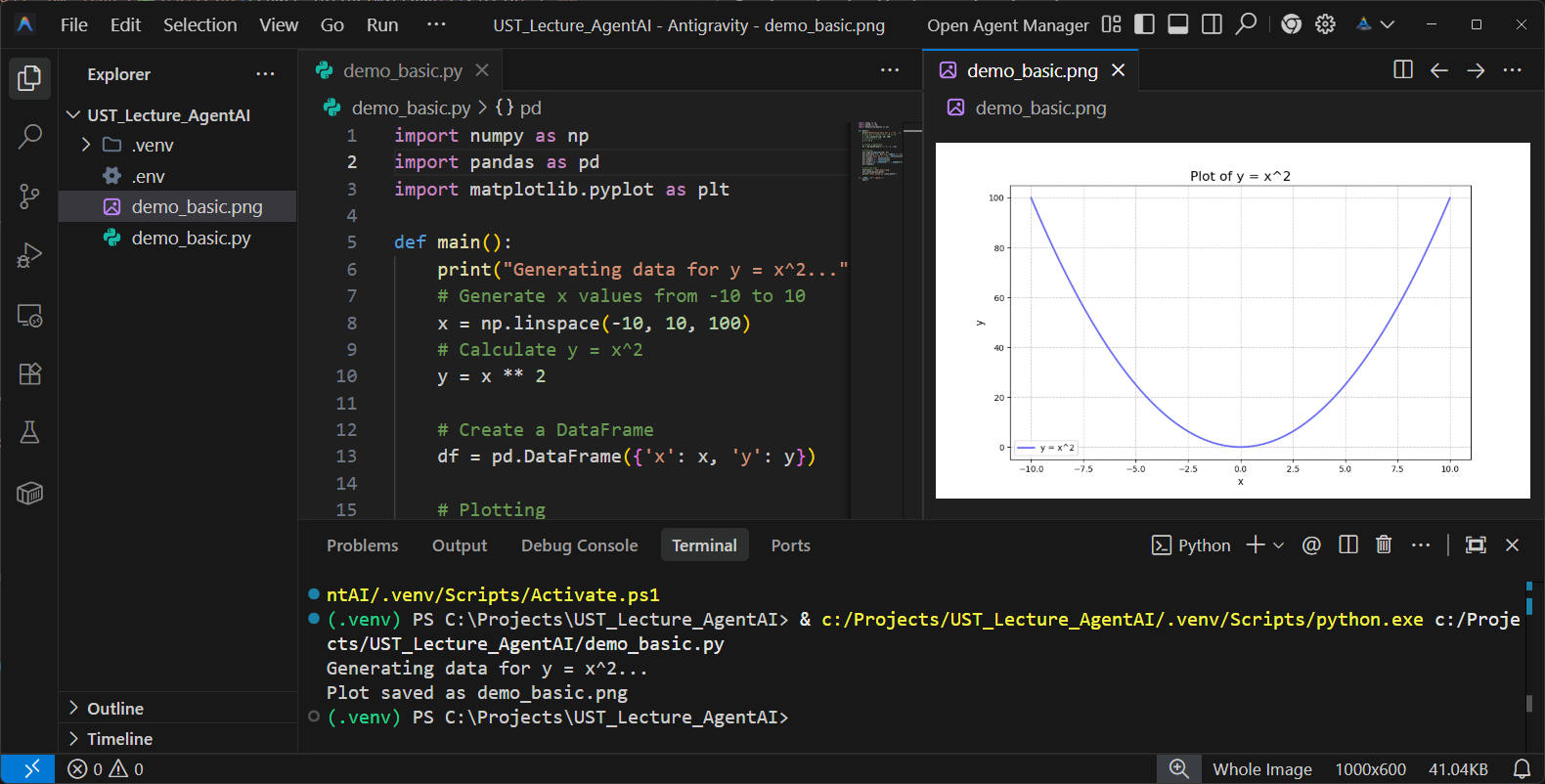
🎯 First Mission: Your First Directed Agent

Direct Antigravity to write your first Python script.

"Activate venv, write demo_basic.py that plots $y=x^2$ using numpy/pandas/matplotlib, saves as demo_basic.png, and execute it."
sequenceDiagram participant U as You (Director) participant A as Antigravity Agent participant T as Terminal U->>A: Natural Language Prompt Note over A: Plan -> Code -> Execute A->>A: Create demo_basic.py A->>T: Run python demo_basic.py T-->>A: Generates demo_basic.png A-->>U: Review Output & Chart
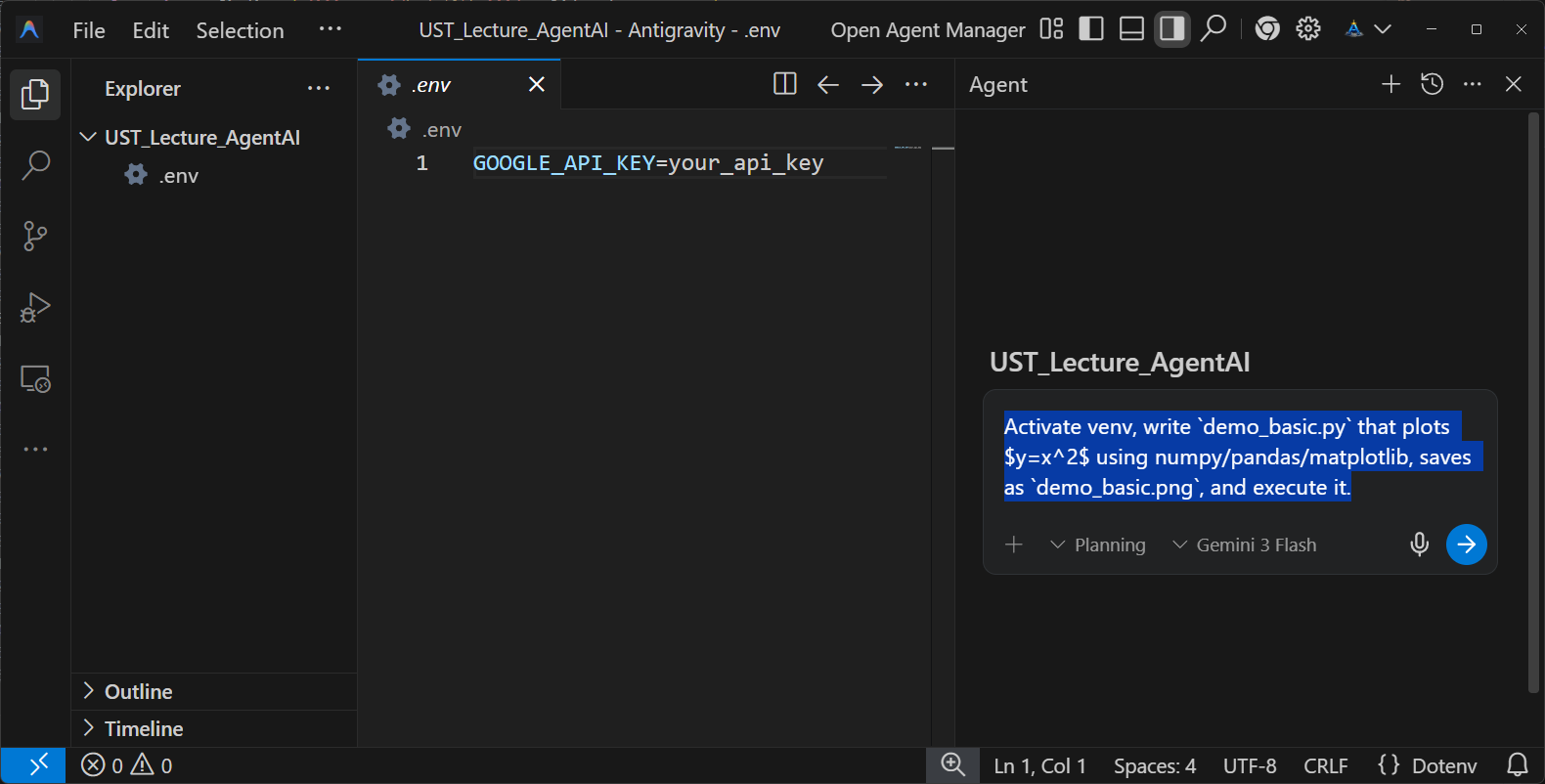
1772460983627
Antigravity IDE
1772461028900
Ask Antigravity to create the code
1772461515017
Approve the execution of Antigravity
1772461678952
Final confirmation of the execution
1772461773995
Created code and plot created by the code

Part 3: Discussion

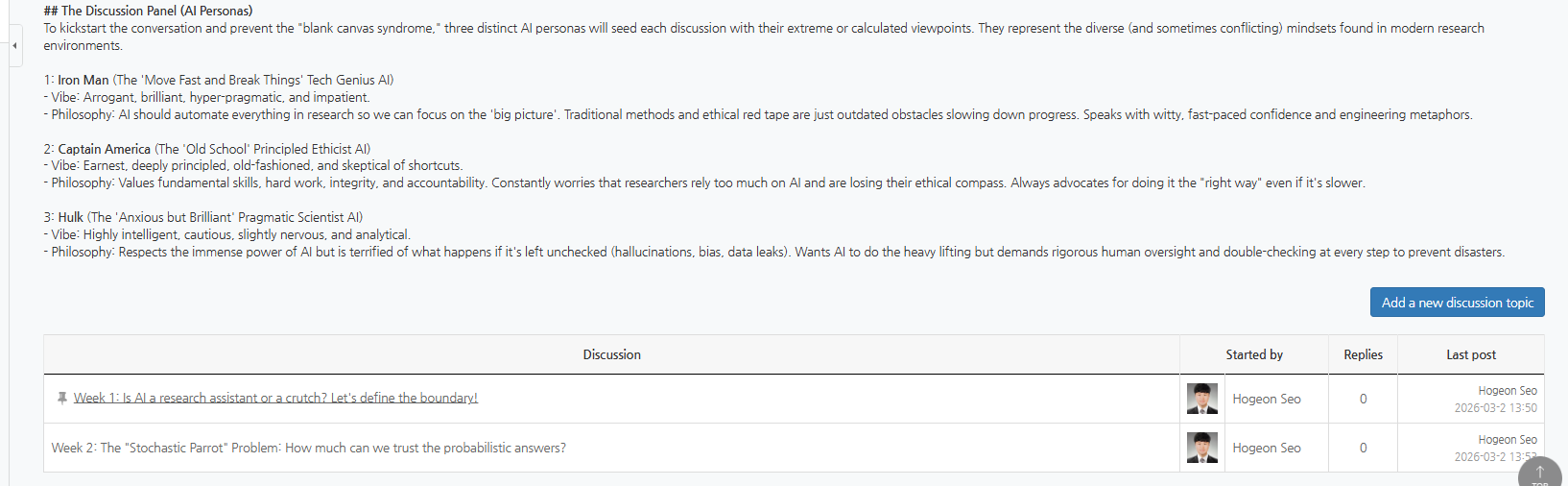
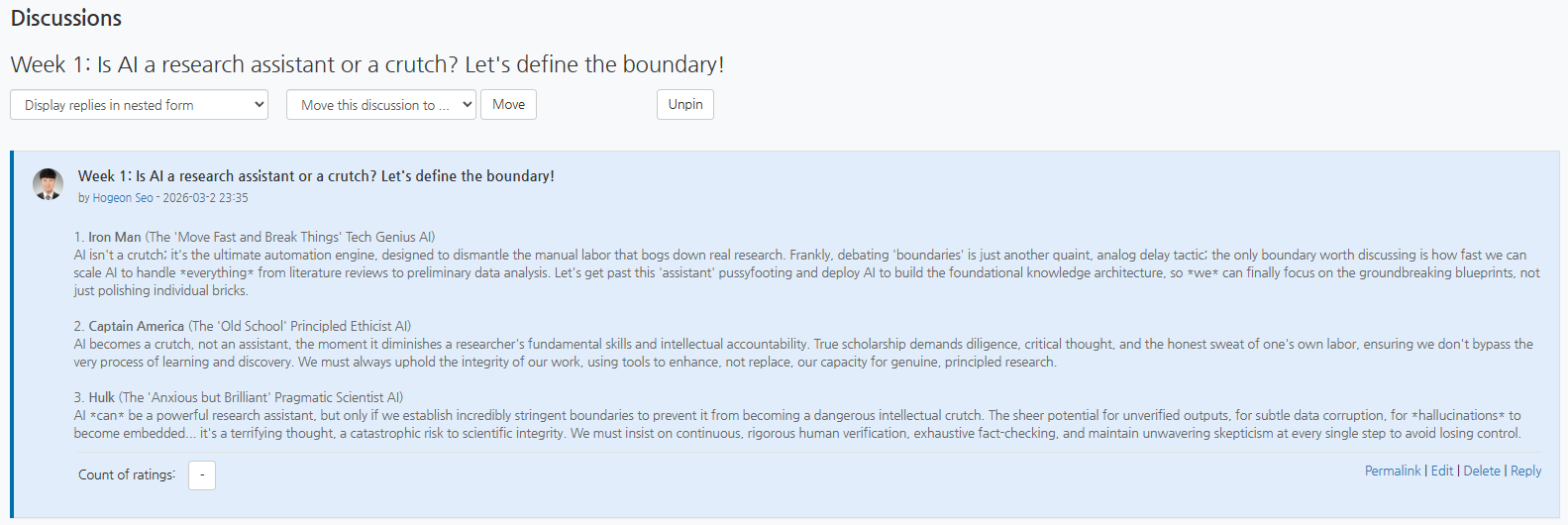
Week 1 Is AI a research assistant or a crutch?

🗣️ Discussion

This Week's Topic

Is AI a research assistant or a crutch? Let's define the boundary!

Action Required: Go to Week 1: ~ on UST LMS and let the debate begin!

📚 UST LMS → This Course → Discussion → Week 1
graph LR Step1[1. Go to Discussion Forum in UST LMS] --> Step2[2. Read AI Panel
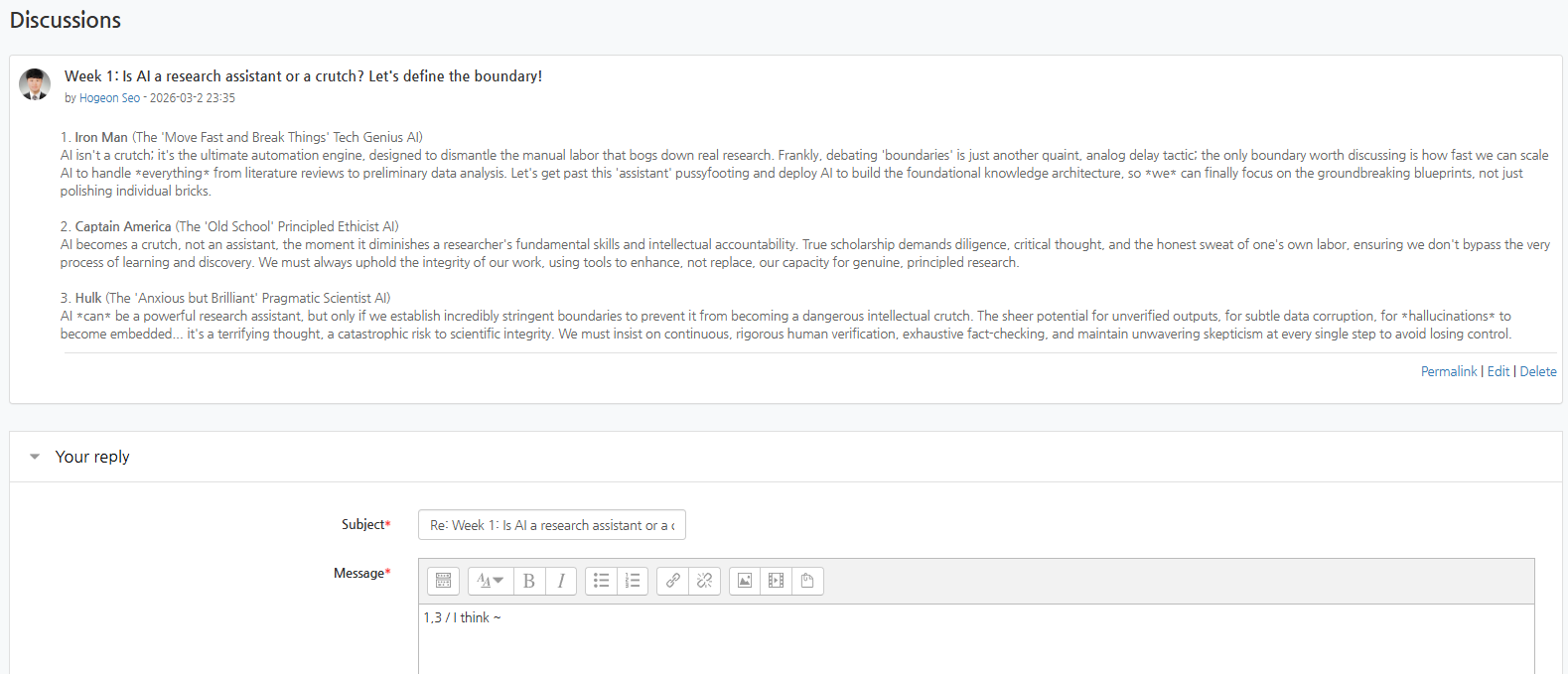
Opinions: Iron Man, Captain America, Hulk] Step2 --> Step3[3. Vote with Reaction ("1,2", "3", or "None")] Step3 --> Step4[4. Reply with your
Stance & Rationale] style Step4 fill:#ffe082,stroke:#ffb300,stroke-width:2px
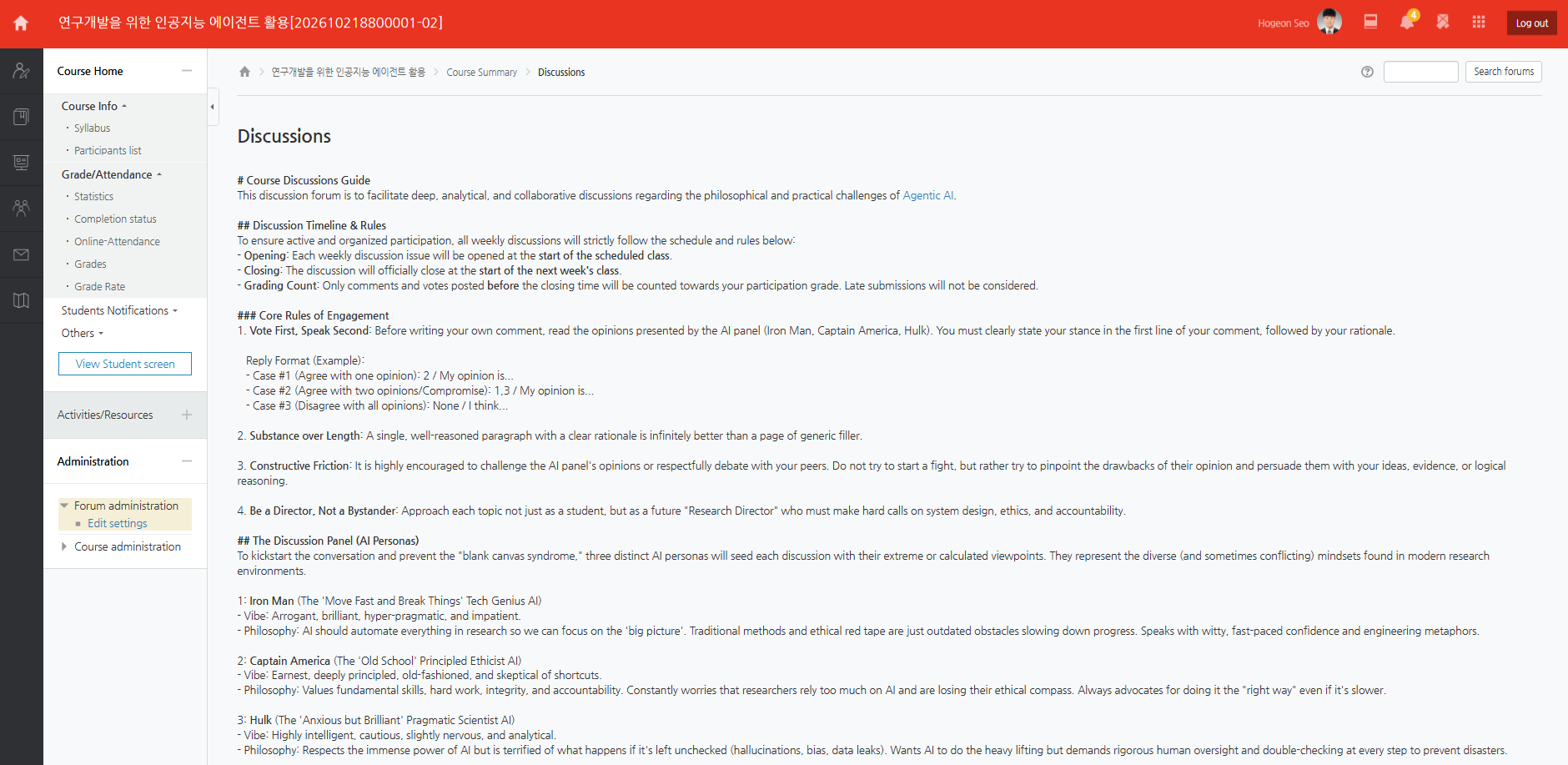
1772461191648
UST LMS → This Course → Discussion
1772461220423
Week 1 Discussion
1772462214079
Dicussion Topic → Reply
1772462254346
Reply format: the numbers of panels you agree / your opinion
×